

Learn how to enable Copilot in WordPress and empower authors to use Microsoft Copilot to rewrite, enhance, expand, and tailor content without leaving the WordPress block editor.
With Copilot Rewrite, authors can select supported Gutenberg blocks and use Microsoft Copilot to generate improved versions of their content without leaving WordPress. Administrators can further guide the generated output by defining enterprise-wide instructions, while individual authors can save their own preferences for tone, audience, length, and style.
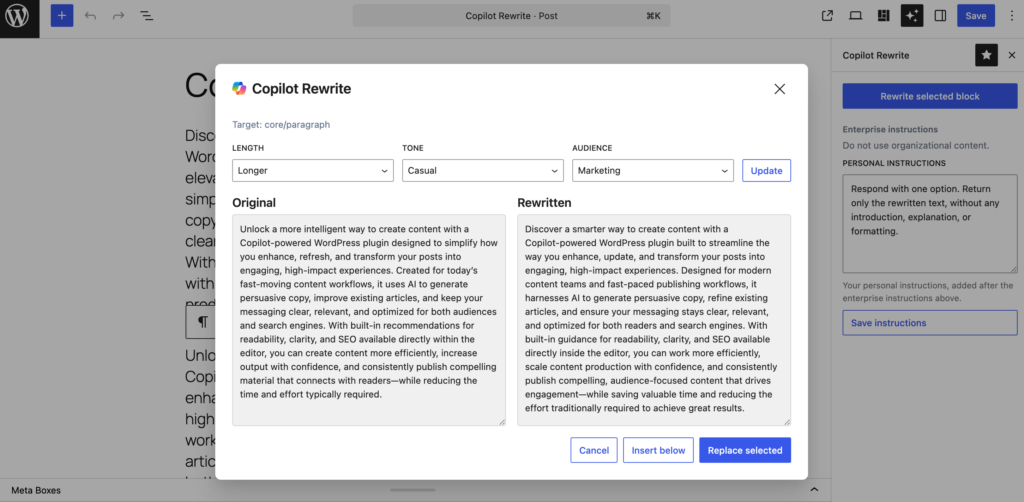
In this course, you will learn how to connect WordPress to Microsoft Copilot, configure the required permissions and licensing, enable the Copilot Rewrite feature, and use it effectively within the Gutenberg editor.
Learn how to enable Copilot in WordPress
- Which WPO365 plugins are required.
- How to prepare Microsoft Entra ID and Microsoft Graph.
- Which API permissions are needed for Copilot.
- How to enable and configure Copilot Rewrite.
- How to define enterprise-wide Copilot instructions.
- How authors can use Copilot Rewrite in Gutenberg.
- How to customize rewriting requests using tone, audience, length, and personal instructions.
Intended audience
- WordPress Administrators
- Website Owners
- Content Authors
- Microsoft 365 Administrators
Before you begin
Ensure that your WordPress website is already configured for Microsoft Single Sign-on using WPO365 and that users can successfully sign in with their Microsoft Entra ID accounts.