

Please ensure that the following prerequisites to use Copilot in WordPress are met:
- Install the WPO365 | LOGIN plugin for WordPress.
- Install one of the following premium plugins:
- Users must sign in to WordPress using their Microsoft Entra ID account through WPO365 Single Sign-on.
- Single Sign-on must be configured using OpenID Connect so that WPO365 can obtain an access token to connect to Microsoft Graph’s Copilot endpoint.
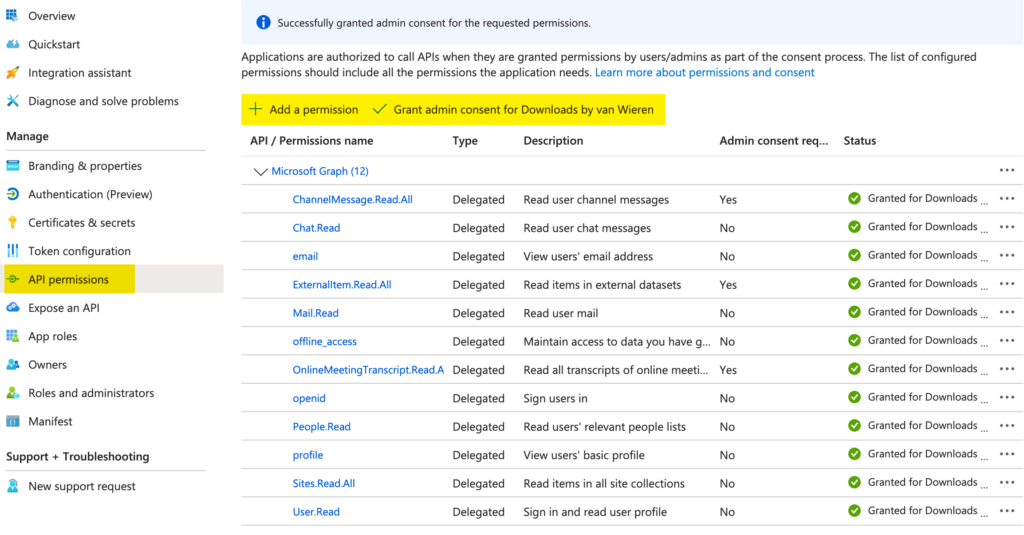
- The Microsoft Entra ID App Registration used for Single Sign-on must have the following additional Microsoft Graph delegated API permissions:
- Sites.Read.All
- Mail.Read
- People.Read.All
- OnlineMeetingTranscript.Read.All
- Chat.Read
- ChannelMessage.Read.All
- ExternalItem.Read.All
- Each author using Copilot Rewrite must have a valid Microsoft Copilot Add-on license.