

An administrator must first enable Copilot Rewrite in WordPress and configure the feature.
Enable Copilot Rewrite in WordPress
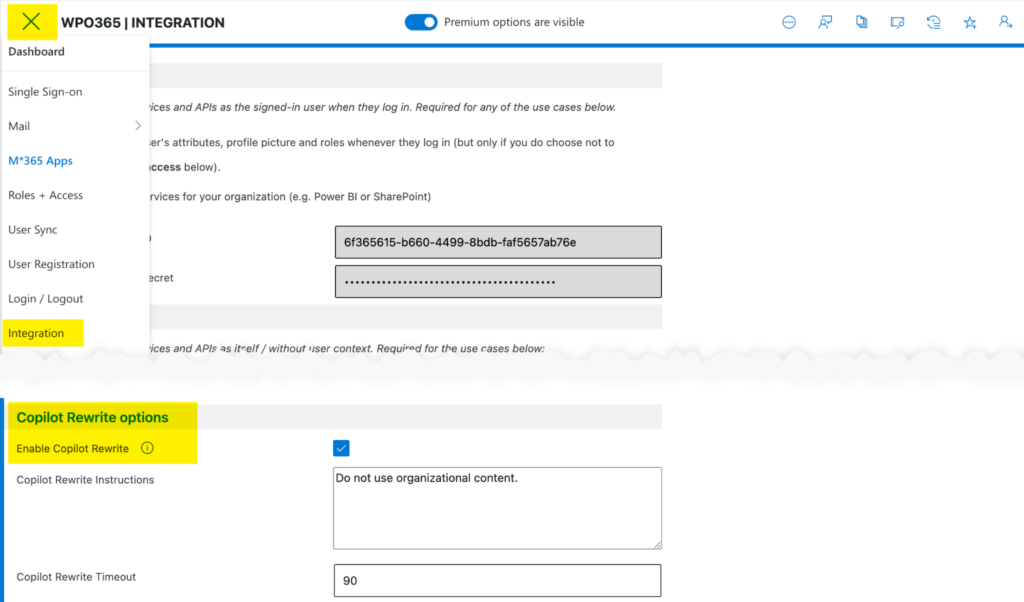
- Navigate to the plugin’s Integration page and enable Copilot Rewrite.
- Alternatively, open the plugin’s Feature Dashboard and toggle Copilot Rewrite on.
Configure Enterprise Instructions
- Enter Copilot Rewrite Instructions to provide enterprise-wide guidance for Copilot, for example Do not use organizational content.
- These instructions are automatically included with every rewrite request.
- Enterprise instructions take precedence over author-specific instructions whenever possible.

Since Copilot is a multi-layer construct that combines AI with other enterprise-search features provided by Microsoft 365, your instructions may be ignored.
Configure the Timeout
- The default timeout for Copilot requests is 90 seconds.
- Administrators can increase or decrease this value as needed.
Please note that hosting providers may enforce shorter server-side timeouts, which can override the configured value.