

Please ensure the following prerequisites to use Copilot Chat in WordPress are met.
- Install and configure the free WPO365 | LOGIN plugin.
- Use WPO365 Single Sign-on to authenticate users with their Microsoft (Entra ID) accounts.
- Configure Single Sign-on using OpenID Connect so that WPO365 can obtain an access token for Microsoft Graph and connect to the /copilot endpoint.
- Ensure that every user who will use Copilot has been assigned a valid Microsoft Copilot Add-on License.
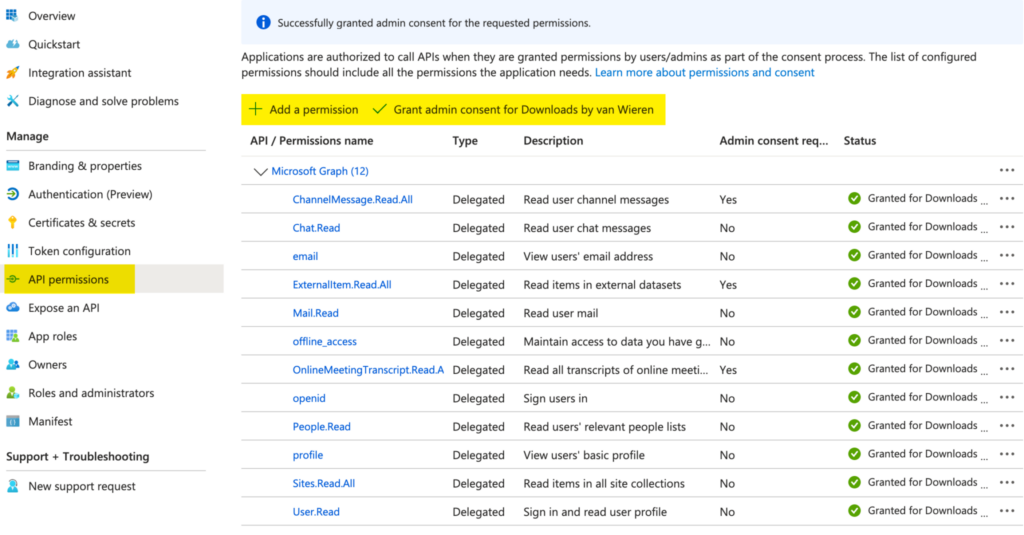
- Grant the following delegated Microsoft Graph API permissions to your Entra ID App Registration:
- Sites.Read.All
- Mail.Read
- People.Read.All
- OnlineMeetingTranscript.Read.All
- Chat.Read
- ChannelMessage.Read.All
- ExternalItem.Read.All

The WPO365 | LOGIN plugin installs the client-side components required to render the Copilot chat experience in WordPress.