

Open the Copilot Rewrite Panel
- Select a supported Gutenberg block:
- Paragraph
- Heading
- List
- Quote
- Code
- Preformatted
- Pullquote
- Verse
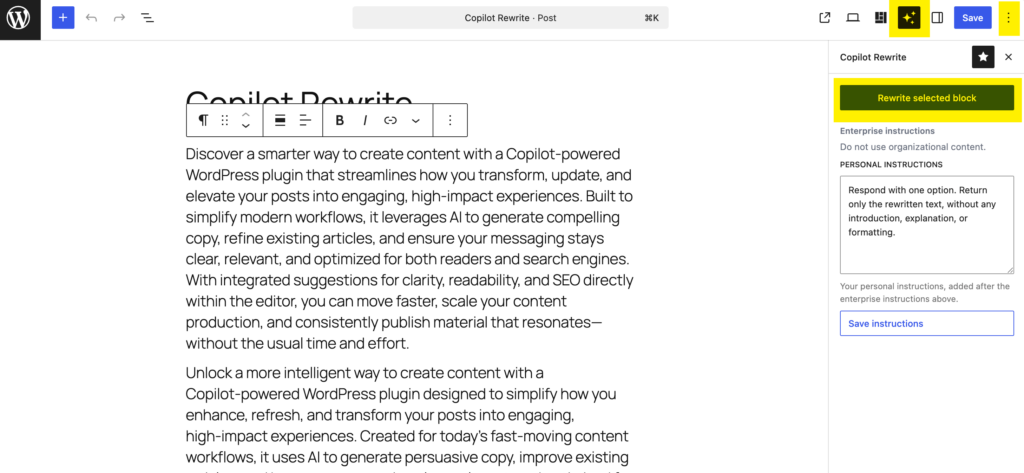
- Open the Copilot Rewrite panel using one of the following methods:
- Click the sparkling stars icon in the editor side panel.
- Click the three vertical dots in the side panel header and select Copilot Rewrite from the Panels section.
Rewrite Content
- Select a supported block.
- Click Rewrite selected block.
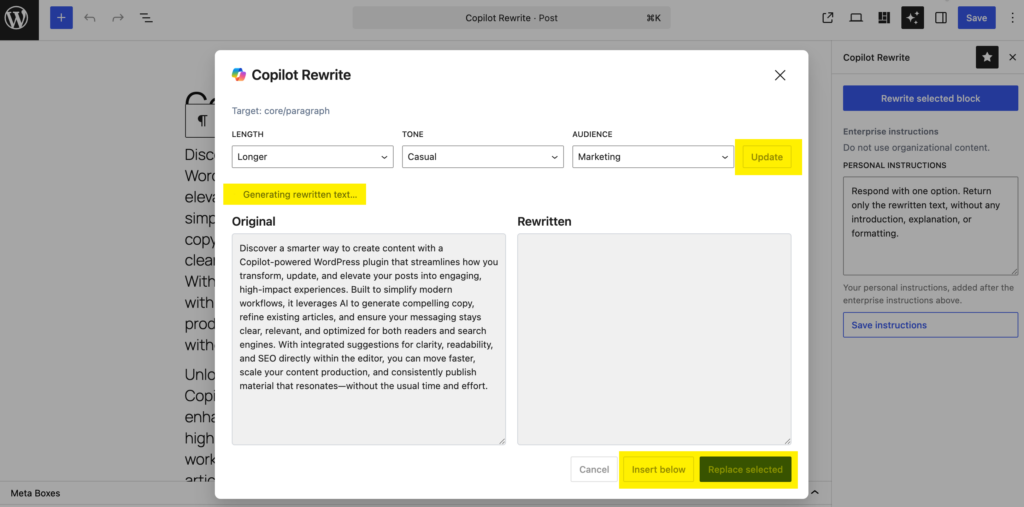
- The Copilot Rewrite dialog will open.
- The original content is displayed on the left side of the dialog.
- Copilot is contacted immediately to generate a rewritten version of the selected content.
- While the request is being processed:
- A pulsing icon is displayed.
- The message Generating rewritten text… appears.
Review the Result
- Once Copilot returns a response, the rewritten text appears on the right side of the dialog.
- The original and rewritten versions are displayed side-by-side for easy comparison.
Apply the Rewrite
- Click Replace selected to replace the content of the selected block.
- Click Insert below to insert the rewritten content as a new block directly beneath the selected block.
Refine the Result
- If the generated text is not yet satisfactory, click Update to ask Copilot for another version.
- Before requesting an update, you can adjust:
- Length:
- Shorter
- Equal
- Longer
- Tone:
- Formal
- Neutral
- Casual
- Friendly
- Audience:
- General
- Technical
- Marketing
- Executive
- Length:
- These preferences are automatically saved and reused for future rewrite requests.
Personal Instructions
- Authors can enter their own personal rewrite instructions in the Copilot Rewrite panel.
- Personal instructions are included with every request sent to Copilot.
- The final prompt combines:
- Enterprise instructions configured by the administrator.
- The author’s preferred length, tone, and audience settings.
- The author’s personal instructions.
- The content of the selected Gutenberg block.
- Enterprise instructions remain authoritative and may override conflicting author instructions.

Pleas note that the Copilot Rewrite only works with supported Gutenberg block types. The quality and relevance of the generated content depend on the available Microsoft Copilot capabilities, the selected preferences, and the instructions provided.